What you’ll need
Build the ultimate studio by spending wisely where you have to, while getting what you can for free
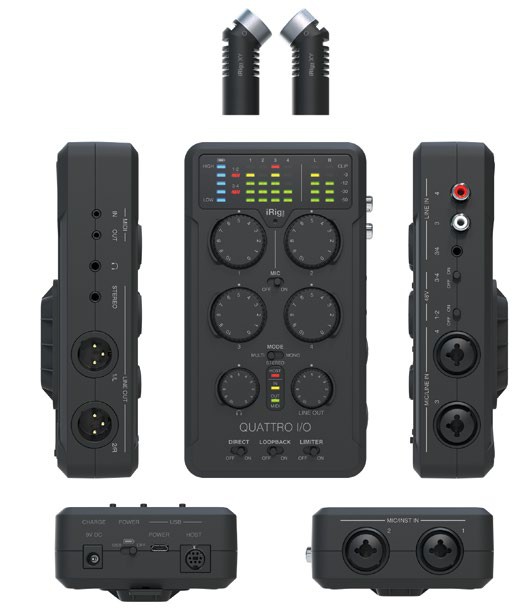
An audio interface can handle the recording of several mics. Models like IK Multimedia’s iRig Quattro work especially well with Apple devices.
CREATING A PODCAST is rather like making a radio show, or indeed a basic music recording using microphones. At its simplest, a podcast studio can be your desk or a spare room, preferably one that’s away from unwanted background noise, such as a noisy road. If there’s only going to be one person speaking, or two people sitting close together, you only really need one microphone. There are plenty of good quality USB mics for around $80– $120, such as those from Blue Microphones, Zoom, Røde and Shure. Some stand on your desk, while others need to be attached to a boom stand which will give you more flexibility, but can add slightly to the cost.
Most microphones tend to have integrated pop filters, which help you achieve a cleaner voice recording while reducing the peaks that can naturally occur when your mouth makes “p” or “t” sounds. In fact, some companies offer podcast hardware bundles with a microphone, headphones and audio interface, which are often sold for a fair bit less than their component parts. If you need two or more mics, you’ll have to go with more traditional XLRequipped models, and these will need to be connected to an audio interface or a mixer. IK Multimedia makes the iRig series, and the new iRig Pro Quattro I/O offers four inputs as well as compatibility across macOS, Windows and even Android and iOS. Dedicated podcast mixers do exist and can be pricier, but something like the RødeCaster Pro or Tascam Mixcast 4 will be designed specifically for mixing podcasts.